前言
最近,刚好也是游玩了鸣潮这款游戏,然后在B站上看到了一些关于鸣潮的电子设定类网站,观摩了下打算在使用组件来写。在这个过程中,会去除了一些光效并采用自己之前写的一个卡片类文章组件。
注意
大多数组件未适配多角色类型,可以在该版本的基础上进行优化,在本站适配完全部角色后会移除该提示。
档案组件
人物主体
<script setup lang="ts">
import Title from '../card/title.vue';

// ==================== 类型定义 ====================
interface Props {
  类型: '爱弥斯' | '尤诺' | '奥古斯塔';
  头像: string;
  徽章: Record<string, string>;
  名字: string;
  标签: Record<string, string>;
  简介: string[];
  详情信息: Record<string, string>;
  档案: {
    具体信息: Array<{
      序号: number;
      徽章: string;
    }>;
    外挂信息: {
      简介: string[];
    };
    顶栏信息: {
      主标题: string;
    };
  };
}

const props = defineProps<Props>();

// ==================== 计算属性 ====================
const getInfoGridColumns = (type: string): number => {
  const columnMap: Record<string, number> = {
    爱弥斯: 4,
    尤诺: 3,
    奥古斯塔: 3,
  };
  return columnMap[type] || 3;
};
</script>

<template>
  <div class="hero-main">
    <div class="hero-card">
      <!-- ==================== 左侧头像区 ==================== -->
      <div class="left-info">
        <NuxtImg class="avatar-image" :src="头像" />
        <h3 class="avatar-name">{{ 名字 }}</h3>
        <div class="avatar-meta">
          <span
            v-for="[key, value] in Object.entries(徽章 ?? {})"
            :key="key"
            class="meta-tag"
          >
            {{ key }}:{{ value }}
          </span>
        </div>
      </div>

      <!-- ==================== 右侧内容区 ==================== -->
      <div class="right-info">
        <div class="panel-main">
          <!-- 简介 -->
          <Title title="简介" />
          <div class="hero-desc">
            <slot name="desc" />
          </div>

          <!-- 标签 -->
          <Title title="标签" />
          <div class="tag-container">
            <span
              v-for="[key, value] in Object.entries(标签 ?? {})"
              :key="key"
              class="tag"
            >
              #{{ value }}
            </span>
          </div>

          <!-- 详情信息 -->
          <Title title="详情信息" />
          <div
            class="info-grid"
            :style="{ gridTemplateColumns: `repeat(${getInfoGridColumns(类型)}, 1fr)` }"
          >
            <div
              v-for="[key, value] in Object.entries(详情信息 ?? {})"
              :key="key"
              class="info-item"
            >
              <div class="info-label">{{ key }}</div>
              <div class="info-value">{{ value }}</div>
            </div>
          </div>

          <!-- 档案 -->
          <Title :title="档案?.顶栏信息.主标题" />
          <div
            v-for="data in 档案?.具体信息"
            :key="data.序号"
            class="status-card"
            :class="`type-${类型}`"
          >
            <div class="status-header">
              <div
                v-for="(item, index) in 档案.外挂信息.简介 ?? []"
                v-show="data.序号 === index + 1"
                :key="index"
                class="header-title"
              >
                {{ item }}
              </div>
              <div
                v-if="类型 === '爱弥斯'"
                class="header-badge"
                :class="`badge-${data.序号}`"
              >
                {{ data.徽章 }}
              </div>
            </div>
            <div class="status-content">
              <div
                v-for="statusIndex in 档案?.外挂信息.简介.length"
                v-show="data.序号 === statusIndex"
                :key="statusIndex"
              >
                <slot :name="`status${statusIndex}`" />
              </div>
            </div>
          </div>
        </div>
      </div>
    </div>
  </div>
</template>

<style lang="scss" scoped>
/* ==================== 主容器样式(保持原样) ==================== */
.hero-main {
  width: 100%;
  height: 320px;
  background: var(--ld-bg-card);
  border: 1px solid var(--c-border);
  border-radius: 0.75rem;
  margin: 1.5rem 0;
  overflow: hidden;
  transition: border-color 0.3s ease;
  display: flex;
}

.hero-card {
  flex: 1;
  display: flex;
  gap: 1rem;
  padding: 1rem;
  overflow: hidden;
}

/* ==================== 左侧头像区(保持原样) ==================== */
.left-info {
  position: relative;
  flex-shrink: 0;
  display: flex;
  flex-direction: column;
  align-items: center;
  width: 200px;
  padding: 12px;
  border-radius: 16px;
  border: 2px solid transparent;
  background-clip: padding-box;
  transition: all 0.3s;
  overflow: hidden;

  .avatar-image {
    width: 100%;
    height: auto;
    border-radius: 12px;
    display: block;
  }

  .avatar-name {
    margin-top: 8px;
    font-size: 14px;
    font-weight: 700;
    text-align: center;
    color: var(--c-text);
  }

  .avatar-meta {
    display: flex;
    flex-wrap: wrap;
    gap: 8px;
    align-items: center;
    justify-content: center;
    margin-top: 4px;

    .meta-tag {
      font-size: 12px;
      font-weight: 600;
      color: var(--c-text-sub);
      background: rgba(255, 140, 176, 0.1);
      padding: 2px 6px;
      border-radius: 4px;
      border: 1px solid var(--pink-core);
    }
  }
}

/* ==================== 右侧内容区(保持原样) ==================== */
.right-info {
  flex: 1;
  display: flex;
  flex-direction: column;
  gap: 12px;
  overflow-y: auto;
  scrollbar-width: none;

  &::-webkit-scrollbar {
    display: none;
  }
}

.panel-main {
  position: relative;
  z-index: 6;

  .hero-desc {
    font-size: 14px;
    color: var(--c-text-content);
    line-height: 1.6;
    margin-bottom: 1rem;
  }
}

/* ==================== 标签样式(保持原样) ==================== */
.tag-container {
  display: flex;
  flex-wrap: wrap;
  gap: 0.3em 0.6em;
  margin: 0.5em 0;

  .tag {
    background-color: var(--c-bg-soft);
    border-radius: 0.4em;
    color: var(--c-text-soft);
    font-size: 0.9em;
    padding: 0.25em 0.6em;
    transition: all 0.2s;
    cursor: pointer;

    &:hover {
      background-color: var(--c-primary-soft);
      color: var(--c-primary);
    }
  }
}

/* ==================== 详情信息网格(保持原样) ==================== */
.info-grid {
  display: grid;
  gap: 0.4rem;
  margin: 0.5em 0;
  font-size: 1rem;
}

.info-item {
  display: flex;
  flex-direction: column;
  gap: 0.1rem;
  margin: 0.5em 0;

  .info-label {
    color: var(--c-text-2);
    font-size: 0.8rem;
    font-weight: 500;
  }

  .info-value {
    color: var(--c-text);
    font-size: 0.8rem;
    word-break: break-word;
  }
}

/* ==================== 档案状态卡(保持原样) ==================== */
.status-card {
  background: rgba(122, 92, 61, 0.08);
  border-radius: 6px;
  padding: 10px;
  margin-top: 0.5em;

  .status-header {
    display: flex;
    align-items: center;
    gap: 8px;
    margin-bottom: 6px;

    .header-title {
      font-weight: 600;
      color: var(--c-text);
    }

    .header-badge {
      font-size: 0.75rem;
      padding: 2px 6px;
      border-radius: 4px;

      &.badge-1 {
        background: rgba(255, 0, 0, 0.2);
        color: #ff6b85;
      }
    }
  }

  &.type-尤诺 .status-header {
    margin-bottom: 2px;
  }

  .status-content {
    font-size: 13px;
    color: var(--c-text-content);
    line-height: 1.5;
  }
}

/* ==================== 移动端适配(保持原样) ==================== */
@media screen and (max-width: 768px) {
  .hero-main {
    height: auto;
    margin: 1rem 0;
    border-radius: 0.5rem;
  }

  .hero-card {
    flex-direction: column;
    gap: 0.5rem;
    padding: 0.75rem;
  }

  .left-info {
    width: 100%;
    padding: 0.5rem;
    border-radius: 10px;

    .avatar-image {
      width: 200px;
      height: 200px;
      border-radius: 8px;
    }

    .avatar-name {
      font-size: 12px;
      margin-top: 4px;
    }

    .avatar-meta {
      font-size: 0.7rem;
      gap: 4px;

      .meta-tag {
        font-size: 0.7rem;
        padding: 3px 6px;
        border-radius: 6px;
      }
    }
  }

  .panel-main {
    .hero-desc {
      font-size: 0.85rem;
      line-height: 1.4;
    }
  }

  .tag-container {
    gap: 0.2em 0.4em;

    .tag {
      font-size: 0.75em;
      padding: 0.2em 0.5em;
    }
  }

  .info-grid {
    grid-template-columns: repeat(3, 1fr) !important;
    gap: 0.2rem;
    font-size: 0.8rem;
  }

  .info-item {
    gap: 0.1rem;

    .info-label,
    .info-value {
      font-size: 0.75rem;
    }
  }

  .status-card {
    padding: 8px;
    border-radius: 5px;

    .status-header {
      gap: 6px;
      margin-bottom: 4px;
    }

    .status-content {
      font-size: 0.8rem;
      line-height: 1.4;
    }
  }
}
</style>
整体说明
hero属性
| 配置项 | 类型 | 说明 |
|---|---|---|
| 类型 | "爱弥斯"、"尤诺"、"奥古斯塔" | 角色类型(目前只有几种,未适配完成) |
| 头像 | string | 角色头像 |
| 徽章 | Record<string, string> | 角色徽章(共鸣能力、属性等等) |
| 名字 | string | 角色名字 |
| 标签 | Record<string, string> | 角色曾用标签 |
| 详情信息 | Record<string, string> | 角色全局信息 |
| 简介 | string[] | 角色简介内容,通过使用 string 类型搭配 solt 标签,防止无法被文章字数计数到 |
| 档案 | 档案[] | 角色档案数据 |
档案属性
| 配置项 | 类型 | 说明 |
|---|---|---|
| 标题 | string? | 预留输入标题数据,作为档案主标题显示 |
| 简介 | string[] | 预留输入简介数据,通过使用 string 类型搭配 solt 标签,防止无法被文章字数计数到 |
| 信息 | Array<信息[]> | 使用 **Array** 方式来进行分开,具有多适应性的效果 |
信息属性
| 配置项 | 类型 | 说明 |
|---|---|---|
| 序号 | number | 作为锚定档案简介的显示计数 |
| 主标题 | string | 作为每个档案中的主要标题 |
| 副标题 | string | 作为每个档案中的副标题,为一类标签具有补充效应,可选可不选 |
人物物品
<script setup lang="ts">
import { ref, computed } from 'vue';
import Title from '../card/title.vue';

const props = defineProps<{
  heroSpecialList?: Array<{
    物品名称?: string       // 卡片标题
    物品含意?: string        // 卡片描述
    物品图像?: string       // 卡片主图
    密钥?: number
  }>
  类型: '爱弥斯' | '莫宁' | '琳奈'
  物品彩蛋?: string[]
  物品简介?: string[]
}>();

// 跟踪当前激活的卡片索引(初始激活第一个)
const activeIndex = ref(0);

// 计算每个卡片内容的显示状态(始终渲染,通过CSS控制显隐)
const cardVisibility = computed(() => {
  return (index: number) => activeIndex.value === index;
});
</script>

<template>
  <div class="infoCard">
    <!-- 左侧导航区:渲染所有导航头像,点击切换激活项 -->
    <div class="navArea">
      <div
        class="navItem"
        v-for="(item, index) in heroSpecialList"
        :key="index"
        @click="activeIndex = index"
        :class="{ active: activeIndex === index }"
      >
        <NuxtImg
          v-if="item.物品图像"
          :src="item.物品图像"
          alt="导航头像"
          class="nuxtImage"
          style="width: 40px; height: 40px; border-radius: 50%; object-fit: cover;"
        />
      </div>
    </div>

    <!-- 右侧内容区:始终渲染所有卡片内容,通过CSS控制显示/隐藏 -->
    <div class="contentArea">
      <div
        v-for="(item, index) in heroSpecialList"
        :key="index"
        class="cardContentWrapper"
        :style="{ display: cardVisibility(index) ? 'flex' : 'none' }"
      >
        <div class="cardLeft">
          <!-- 卡片主图 -->
          <img :src="item.物品图像" class="cardImage" alt="卡片主图" />
          <!-- 卡片标题 -->
          <h3 class="cardTitle">{{ item.物品名称 || '默认标题' }}</h3>
          <!-- 卡片附属名称(如角色名) -->
          <div class="cardSubInfo">
            <span>{{ item.物品含意 || '默认名称' }}</span>
          </div>
        </div>
        <div class="cardRight">
          <!-- 卡片描述 -->
          <Title title="描述" />
          <div class="cardDesc" v-for="index in props.物品简介?.length" v-show="item.密钥 === index">
            <slot :name="`desc${index}`" />
          </div>
          <!-- 彩蛋区域(仅爱弥斯类型显示) -->
          <div v-if="类型 === '爱弥斯'">
            <Title title="彩蛋" />
            <div class="cardYouLai" v-for="index in props.物品彩蛋?.length" v-show="item.密钥 === index">
              <slot :name="`caidan${index}`" />
            </div>
          </div>
        </div>
      </div>
    </div>
  </div>
</template>

<style lang="scss" scoped>
.infoCard {
  width: 100%;
  height: 320px;
  background: var(--ld-bg-card);
  border: 1px solid var(--c-border);
  border-radius: 0.75rem;
  margin: 1.5rem 0;
  overflow: hidden;
  transition: border-color 0.2s ease;
  display: flex; /* 整体左右布局 */

  /* 左侧导航区:垂直排列头像 */
  .navArea {
    display: flex;
    flex-direction: column;
    align-items: center;
    justify-content: flex-start;
    padding: 1rem;
    width: 60px; /* 导航区宽度,适配头像垂直排列 */
    gap: 8px;    /* 头像之间的间距 */

    .navItem {
      cursor: pointer;
      width: 40px;
      height: 40px;
      display: flex;
      align-items: center;
      justify-content: center;
      border-radius: 50%;
      transition: all 0.2s ease;

      &:hover {
        background-color: var(--c-bg-hover); /*  hover 背景色 */
      }

      &.active {
        background-color: var(--c-bg-active); /* 激活态背景色 */
      }
    }
  }

  /* 右侧内容区:卡片详情 */
  .contentArea {
    flex: 1;
    display: flex;
    gap: 1rem;
    padding: 1rem;
    overflow: hidden;

    .cardLeft {
      flex-shrink: 0;
      display: flex;
      flex-direction: column;
      align-items: center;
      width: 200px; /* 左侧卡片预览区宽度 */
      overflow: hidden;

      .cardImage {
        width: 100%;
        object-fit: cover;
        border-radius: 8px;
      }

      .cardTitle {
        margin-top: 8px;
        font-size: 14px;
        font-weight: bold;
        color: var(--c-text-title);
        text-align: center
      }

      .cardSubInfo {
        margin-top: 4px;
        font-size: 12px;
        color: var(--c-text-sub);
        background: rgba(122, 92, 61, 0.1);
        padding: 2px 6px;
        border-radius: 4px;
      }
    }

    .cardRight {
      flex: 1;
      display: flex;
      flex-direction: column;
      gap: 10px;
      overflow-y: scroll; /* 启用垂直滚动 */
      padding-right: 20px; /* 防止内容被遮挡 */
      /* 隐藏滚动条 - Webkit浏览器 */
      &::-webkit-scrollbar {
          width: 0;
          background: transparent;
      }
      /* 隐藏滚动条 - Firefox */
      scrollbar-width: none;
      /* 隐藏滚动条 - IE/Edge */
      -ms-overflow-style: none;

      .cardDesc, .cardYouLai {
        font-size: 14px;
        color: var(--c-text-content);
        line-height: 1.6;
        display: -webkit-box;
        -webkit-box-orient: vertical;
        .title {
          background: #ffffffb2;
          color: #ff9900b2
        }
      }
      .cardYouLai {
        display: block;
        color: var(--blue-glow);
        font-size: .85rem;
        border-left: 3px solid var(--pink-core);
        padding-left: 12px;
      }

      .tagItem {
        display: flex;
        flex-wrap: wrap;
        gap: .3rem;

        .tag {
          border-radius: .3rem;
          display: inline-block;
          font-size: 14px;
          white-space: nowrap;
        }
      }

      /* 技能模块样式 */
      .cardSkills {
        .skillsContainer {
          display: flex;
          flex-direction: column;
          gap: 12px;
        }

        .skillItem {
          background: rgba(122, 92, 61, 0.08);
          border-radius: 6px;
          padding: 10px;

          .skillHeader {
            display: flex;
            align-items: center;
            gap: 8px;
            margin-bottom: 6px;

            .skillIcon {
              width: 24px;
              height: 24px;
              border-radius: 4px;
              object-fit: cover;
            }

            .skillName {
              font-size: 15px;
              color: var(--c-text-title);
            }
            .skillXg {
              font-size: 12px;
              color: var(--c-bg-content);
            }
          }
          .skillDesc {
            font-size: 13px;
            color: var(--c-text-content);
            line-height: 1.5;
          }
        }

        .noSkill {
          color: var(--c-text-sub);
          font-style: italic;
          padding: 8px;
          text-align: center;
          background: rgba(122, 92, 61, 0.05);
          border-radius: 6px;
        }
      }
    }
  }
}

/* 在原有样式基础上添加移动端适配 */
@media (max-width: 768px) {
  .infoCard {
    flex-direction: column;
    height: auto;
    padding: 0.5rem;

    .navArea {
      flex-direction: row;
      width: 100%;
      padding: 0.5rem;
      justify-content: flex-start;
      overflow-x: auto;

      .navItem {
        flex-shrink: 0;
        margin: 0 4px;

        .nuxtImage {
          width: 32px;
          height: 32px;
        }
      }
    }

    .contentArea {
      flex-direction: column;
      padding: 0.5rem;
      gap: 0.5rem;

      .cardLeft {
        width: 100%;
        align-items: center;

        .cardImage {
          max-width: 150px;
          height: auto;
        }

        .cardTitle {
          font-size: 20px;
        }

        .cardSubInfo {
          font-size: 15px;
        }
      }

      .cardRight {
        width: 100%;
        padding-right: 0;

        .cardDesc, .cardYouLai {
          font-size: 13px;
        }

        .tagItem .tag {
          font-size: 12px;
          padding: 2px 4px;
        }

        .cardSkills {
          .skillItem {
            padding: 8px;

            .skillHeader .skillName {
              font-size: 14px;
            }

            .skillDesc {
              font-size: 12px;
            }
          }
        }
      }
    }
  }
}

/* 超小屏幕优化 */
@media (max-width: 480px) {
  .infoCard {
    .contentArea {
      .cardLeft .cardImage {
        max-width: 150px;
      }

      .cardRight {
        .cardSkills .skillItem {
          padding: 6px;
        }
      }
    }
  }
}
</style>
整体说明
| 配置项 | 类型 | 说明 |
|---|---|---|
| 物品图像 | string | 物品图片(与物品切换图标绑定) |
| 物品名称 | string | 物品名称 |
| 物品含义 | string | 物品的小标签,说明其中的含义 |
| 物品彩蛋 | string | 物品的小彩蛋,说明该物品在过去或者地方的位置 |
| 物品简介 | string | 物品的简介,通常与来历、分量等等有关 |
人物故事
<script setup lang="ts">
import Title from '../card/title.vue';

const props = defineProps<{
	/** story 下标从 1 开始 */
	故事?: string[]
	居中?: boolean
	密钥?: string | number
  标题?: string
}>()

// 使用 v-bind:active 以传递 Number 值
const activeStory = ref(Number(props.密钥) || 1)
</script>

<template>
<div :class="{ 居中 }" class="heroStoryMain">
  <Title :title="props.标题" style="margin-bottom: 10px;"/>
	<div class="storys">
		<button
			v-for="(story, storyIndex) in 故事"
			:key="storyIndex"
			:class="{ active: activeStory === storyIndex + 1 }"
			@click="activeStory = storyIndex + 1"
		>
			{{ story }}
		</button>
	</div>
	<div v-for="storyIndex in 故事.length" v-show="activeStory === storyIndex" :key="storyIndex" class="story-content">
		<slot :name="`story${storyIndex}`" />
	</div>
</div>
</template>

<style lang="scss" scoped>
.float-in-leave-active {
	/* stylelint-disable-next-line declaration-no-important */
	position: revert !important;
}

.heroStoryMain {
  background: var(--ld-bg-card);
  border: 1px solid var(--c-border);
  border-radius: 0.75rem;
  margin: 1.5rem 0;
  overflow: hidden;
  transition: border-color 0.2s ease;
  /* display: flex; */
  padding: 1rem;
}

.center {
	width: fit-content;
	max-width: 100%;
	margin-inline: auto;
}

.storys {
	display: flex;
	flex-wrap: wrap;
	justify-content: center;
	gap: 0.5em;
	position: relative;
	width: fit-content;
	margin: 0 auto;
	font-size: 0.9em;
	line-height: 1.4;
}

button {
	position: relative;
	margin-bottom: 0.5em;
	padding: 0.3em 0.5em;
	border-radius: 0.4em;
	color: var(--c-text-2);
	transition: all 0.2s;

	&:hover {
		background-color: var(--c-bg-soft);
		color: var(--c-text);
	}

	&::before, &::after {
		display: block;
		position: absolute;
		bottom: -0.5em;
		inset-inline: 0.8em;
		height: 2px;
		border-radius: 1em;
		pointer-events: none;
	}

	&::after {
		content: "";
		inset-inline: -0.8em;
		background-color: var(--c-border);
	}

	&.active {
		box-shadow: 0 1px 0.5em var(--ld-shadow);
		background-color: var(--ld-bg-card);
		color: var(--c-text);

		&::before {
			content: "";
			background-color: var(--c-primary);
			z-index: 1;
		}
	}
}

.story-content {
	margin: 1em 0;
}
</style>
整体说明
hero-stories属性
| 配置项 | 类型 | 说明 |
|---|---|---|
| 故事 | string | 故事内容(切换后自动更新) |
| 居中 | boolean | 组件全局信息 |
| 密钥 | string | number | 作为切换时的重要凭证 |
| 标题 | string | 是组件头部标题 |
时间线&彩蛋
<script setup lang="ts">
import type { __String } from 'typescript';
import Title from '../card/title.vue';
import Badge from './Badge.vue';
import Timeline from './Timeline.vue';

const props = defineProps<{
  类型?: '爱弥斯' | '莫宁' | '尤诺'
  顶部?: {
    标题?: string
    副标题?: string
  }
  时间线?: Array<{
    徽章: string[]
    标签: string[]
    密钥: number
  }>
  彩蛋?: Array<{
    图标?: string
    徽章?: string
    密钥?: number | string
    信息列表?: Record<string, string>
  }>
  时间线内容?:string[]
  彩蛋内容?: string[]
}>()
</script>

<template>
  <div class="heroTimelineEasterMain">
    <div class="heroTimelineEasterCard">
      <div class="timelineEasterHeader">
        <Title :title="`${顶部?.标题}`" />
        <Badge :text="顶部?.副标题" />
      </div>

      <!-- 时间线部分 - 修复为两列布局 -->
      <div class="heroTimelineList" :id="类型" v-show="类型 !== '莫宁'">
        <div class="heroTimelineCard" v-for="main in 时间线" :key="main.密钥">
          <div class="heroTimelineLabel" v-for="([key, value], index) in Object.entries(时间线内容 ?? {})" v-show="main.密钥 === index + 1">
            {{ value }}<Badge :text="`${value}`" v-for="([key, value]) in Object.entries(main.徽章 ?? {})" :key="key"/>
          </div>
          <div class="heroTimelineValue" v-for="index in 时间线内容?.length" v-show="main.密钥 === index">
            <slot :name="`Timeline${index}`"/>
          </div>
          <!-- 特定标签位置||未写完 -->
          <div class="heroTimelineTag" v-show="类型 === '尤诺'">
            <span class="heroTimelineTagList" v-for="([key, value]) in Object.entries(main.标签 ?? {})" :key="key">
              <slot class="text">
                {{ value }}
              </slot>
            </span>
          </div>
        </div>
      </div>

      <div class="heroEasterMain" :id="类型">
        <div class="heroEaster WuWuGameColor" v-for="main in 彩蛋" :id="类型">
          <div class="easterNumber" v-show="类型 === '莫宁'">
            {{ main.密钥 }}
          </div>
          <div class="easterHeader">
            <span class="esterTitle" v-for="([key, value], index) in Object.entries(props.彩蛋内容 ?? {})" v-show="main.密钥 === index + 1">{{ value }}</span>
            <Badge :text="`${main.徽章}`" v-show="类型 !== '爱弥斯'"/>
          </div>
          <div class="easterContent">
            <div class="easterDetailMain" :id="类型">
              <div :class="`easterDetailCard item-${main.密钥}`" :id="`content-${index + 1}`" v-for="([key, value], index) in Object.entries(main.信息列表 ?? {})" :key="key"v-show="类型 === '尤诺'">
                <span class="detailKey">{{ key }}</span>
                <span class="detailValue">{{ value }}</span>
              </div>
            </div>
            <div class="easterP" :id="类型" v-for="Index in 彩蛋内容?.length" v-show="main.密钥 === Index">
              <slot :name="`easter${Index}`"></slot>
            </div>
          </div>
        </div>
      </div>
    </div>
  </div>
</template>

<style lang="scss">
.article p {
  margin: 0!important;
}
.heroTimelineEasterMain {
  width: 100%;
  background: var(--ld-bg-card);
  border: 1px solid var(--c-border);
  border-radius: 0.75rem;
  margin: 1.5rem 0;
  overflow: hidden;
  transition: border-color 0.2s ease;
  display: flex;

  .heroTimelineEasterCard {
    flex: 1;
    padding: 1rem;
    display: flex;
    flex-direction: column;
    gap: 0.5rem;

    .timelineEasterHeader {
      display: flex;
      justify-content: space-between;
      align-items: center;
      gap: 12px;
    }

    /* 修复时间线布局 - 一行两列 */
    .heroTimelineList {
      display: grid;
      grid-template-columns: repeat(2, 1fr);
      gap: 0.5em;
      @media (max-width: 560px) {
        grid-template-columns: repeat(1, 1fr);
      }
        .heroTimelineCard {
          display: flex;
          flex-direction: column;
          margin: 0.5em 0;

          .heroTimelineLabel {
            display: flex;
            align-items: center;
            gap: 0.5rem;
            color: var(--c-text-2);
            font-size: 0.8rem;
            font-weight: 500;
          }

          .heroTimelineValue {
            color: var(--c-text);
            font-size: 0.8rem;
            word-break: break-word;
          }

          .heroTimelineTag {
            display: flex;
            flex-wrap: wrap;
            gap: 0.3rem;
            margin-top: 0.25em;
            .heroTimelineTagList {
              padding: 0.25em 0.9em;
              background: rgba(46, 136, 201, 0.2);
              border: 1px solid rgba(127, 211, 255, 0.1);
              border-radius: 0.25rem;
              font-size: 0.65rem;
            }
          }
        }
      }
    .heroEasterMain {
      display: grid;
      gap: 0.5rem;
      .heroEaster {
        border-radius: 0.4em;
        font-size: 1em;
        padding: 0.5em 0.6em;
        transition: all 0.2s;
        .easterHeader {
          display: flex;
          align-items: center;
          font-size: 0.9em;
          .easterIcon {
            font-size: 0.9em;
          }
          .easterTitle {
            font-weight: 700;
            font-size: 0.9em;
          }
        }
        .easterContent {
          font-size: 0.9em;
          .easterP {
            margin: 0;
          }
          .easterDetailMain {
            display: grid;
            .easterDetailCard {
              justify-content: space-between;
              display: flex;
            }
          }
        }
      }
    }
  }
}
/* 外置样式 */
/* 时间线样式 */
.heroTimelineList#尤诺 {
  gap: 0.2rem
}
/* 彩蛋样式 */
.heroEasterMain#爱弥斯 {
  .heroEaster {
    border: 1px dashed var(--pink-core);
  }
}
.heroEasterMain#莫宁 {
  display: grid;
  grid-template-columns: repeat(3, 1fr);
  gap: 10px;
  .heroEaster {
    background: #0003;
    border: 1px solid rgba(74, 165, 255, .1);
    .easterNumber {
      width: 30px;
      height: 30px;
      background: #4aa5ff33;
      border: 1px solid #4aa5ff;
      border-radius: 50%;
      display: flex;
      align-items: center;
      justify-content: center;
      font-weight: 700;
      transition: all .3s;
    }
  }
}
.heroEasterMain#尤诺 {
  grid-template-columns: 2fr 2fr;
  gap: .5rem;
  .heroEaster {
    border: 1px dashed var(--color-tide-light);
    border-radius: 12px;
    padding: 1rem;
    flex-direction: column;
    display: flex;
    gap: 0.5rem;
    .easterHeader {
      justify-content: space-between;
    }
    .easterContent {
      flex-direction: column;
      display: flex;
      gap: 0.5rem;
    }
    .easterDetailCard.item-1#content-1,
    .easterDetailCard.item-2#content-1,
    .easterDetailCard.item-2#content-2 {
      margin-bottom: 0.25rem;
      padding-bottom: 0.25rem;
      border-bottom: 1px solid rgba(127, 211, 255, .1);
    }
    .easterP {
      border: 1px dashed var(--color-tide-light);
      padding: 0.5rem;
      border-radius: 0.5rem;
    }
  }
}
</style>
整体说明
hero-timeline-easter属性
| 配置项 | 类型 | 说明 |
|---|---|---|
| 类型 | '爱弥斯' '尤诺' | 作为模块的显隐逻辑,并且还在一些class中作为id样式显示 |
| 顶部 | Array<顶部> | 具有标题、副标题两类数据 |
| 时间线 | Array<时间线> | 作为显示时间线的模块 |
| 彩蛋 | Array<彩蛋> | 作为显示彩蛋的模块 |
| 时间线内容 | string | 作为驱动solt :name正常运转的核心数据,锚定了时间线的密钥来进行特定显示 |
| 彩蛋内容 | string | 作为驱动solt :name正常运转的核心数据,锚定了彩蛋的密钥来进行特定显示 |
时间线属性
| 配置项 | 类型 | 说明 |
|---|---|---|
| 徽章 | string | 作为Badge的显示字段 |
| 标签 | string | 自定义字段 |
| 密钥 | number | 锚定时间线内容的分页数据所需要的密钥 |
彩蛋属性
| 配置项 | 类型 | 说明 |
|---|---|---|
| 图标 | string | 作为彩蛋开头,是用来显示 |
| 徽章 | string | 作为Badge的显示字段 |
| 密钥 | number string | 锚定彩蛋内容的分页数据所需要的密钥 |
| 信息列表 | Record<string, string> |
共鸣链&&机制
<script setup lang="ts">
import Title from '../card/title.vue';

const props = defineProps<{
  元信息?: Array<{
    链度: number
    标题: string
  }>
  主体?: Array<{
    内容: string[]
    密钥: number
    类型: 'Reson' | 'Mecha'
    标题: string
  }>
}>()
const activeIndex = ref(0)
</script>

<template>
  <div class="heroResonMechaMain">
    <div class="heroResonMechaNav">
      <div
        class="heroResonMechaNavItem"
        v-for="(item, index) in 主体"
        :key="index"
        @click="activeIndex = index"
        :class="{ active: activeIndex === index }"
      >
        <span>{{ item.标题 }}</span>
      </div>
    </div>
    <div class="heroResonMechaList" v-if="主体?.[activeIndex]">
      <div class="heroResonMechaCard" :id="主体?.[activeIndex]?.类型" v-for="card in 元信息" v-show="主体?.[activeIndex]?.类型 === 'Reson'">
        <div class="heroResonTitle">
          第{{card.链度}}链 · {{ card.标题 }}
        </div>
        <div class="heroResonContent" v-for="index in 主体?.[activeIndex]?.内容.length" v-show="card.链度 === index">
          <slot :name="`Reson${index}`" />
        </div>
      </div>
      <div class="heroResonMechaCard" :id="主体?.[activeIndex]?.类型" v-show="主体?.[activeIndex]?.类型 === 'Mecha'">
        <div class="heroMechaContent">
          <slot :name="`Mecha`" />
        </div>
      </div>
    </div>
  </div>
</template>

<style lang="scss" scoped>
.heroResonMechaMain {
  width: 100%;
  height: 320px;
  background: var(--ld-bg-card);
  border: 1px solid var(--c-border);
  border-radius: 0.75rem;
  margin: 1.5rem 0;
  overflow: hidden;
  transition: border-color 0.2s ease;
  display: flex;
  .heroResonMechaNav {
    display: flex;
    flex-direction: column;
    align-items: center;
    justify-content: flex-start;
    padding: 1rem;
    width: 80px;
    gap: 8px;
    .heroResonMechaNavItem {
      cursor: pointer;
      width: 70px;
      height: 40px;
      display: flex;
      align-items: center;
      justify-content: center;
      border-radius: 50%;
      transition: all 0.2s ease;

      &:hover {
        background-color: var(--c-bg-hover);
      }

      &.active {
        background-color: var(--c-bg-active);
      }
    }
  }
  .heroResonMechaList {
    overflow: hidden;
    overflow-y: scroll;
    margin-bottom: 1rem;
    margin-top: 1rem;
    padding-right: 1rem;
    &::-webkit-scrollbar {
      width: 0;
      background: transparent;
    }
    scrollbar-width: none;
    -ms-overflow-style: none;
    .heroResonMechaCard#Reson {
      background: rgba(122, 92, 61, 0.08);
      border-radius: 6px;
      padding: 10px;
      margin-bottom: 10px;
      .heroResonContent {
        font-size: 0.9rem;
        margin: 0px;
        white-space: pre-wrap;
      }
    }
    .heroResonMechaCard#Mecha {
      padding: 10px;
      .heroMechaContent {
        font-size: 0.9rem;
        margin: 0px;
        white-space: pre-wrap;
        p {
          padding: 12px 0;
          border-bottom: 1px dashed rgba(255, 140, 176, .2);
          font-size: 0.78rem;
        }
      }
    }
  }
}

/* 移动端适配:屏幕宽度 ≤ 768px 时生效 */
@media (max-width: 768px) {
  .heroResonMechaMain {
    height: auto; /* 高度自适应内容 */
    flex-direction: column; /* 导航与列表垂直堆叠 */
  }

  .heroResonMechaNav {
    width: 100%; /* 导航占满宽度 */
    flex-direction: column;
    padding: 0.5rem; /* 减少内边距 */
    gap: 8px;

    .heroResonMechaNavItem {
      width: 100%; /* 导航项宽度自适应 */
      height: 44px; /* 增大点击区域 */
      font-size: 0.875rem; /* 字体放大 */
      border-radius: 6px; /* 圆角微调 */
    }
  }

  .heroResonMechaList {
    width: 100%; /* 列表占满宽度 */
    margin: 0; /* 移除上下冗余边距 */
    padding: 0.5rem; /* 内边距缩小 */
    overflow-y: auto; /* 内容少时不显示滚动条 */

    &::-webkit-scrollbar {
      width: 0;
      background: transparent;
    }
    scrollbar-width: none;
    -ms-overflow-style: none;

    .heroResonMechaCard#Reson,
    .heroResonMechaCard#Mecha {
      margin-bottom: 0.75rem; /* 卡片间距缩小 */
      padding: 8px; /* 卡片内边距缩小 */
    }

    .heroResonContent,
    .heroMechaContent {
      font-size: 0.875rem; /* 整体字体缩小 */
      p {
        padding: 8px 0; /* 行间距缩小 */
        border-bottom: 1px dashed rgba(255, 140, 176, .2);
        font-size: 0.75rem; /* 行内字体再缩小 */
      }
    }
  }
}
</style>
整体说明
hero-reson-mecha属性
| 配置项 | 类型 | 说明 |
|---|---|---|
| 主体 | Array<类型> | 通过Array来分开各个模块内容 |
类型属性
| 配置项 | 类型 | 说明 |
|---|---|---|
| 类型 | <'爱弥斯' | '尤诺' | '奥古斯塔'> | 控制组件显隐逻辑 |
| 列表 | Array<列表> | 通过Array来分开并显示内容 |
| 导航 | 导航 | 具有图标与名称两种配置 |
列表属性
| 配置项 | 类型 | 说明 |
|---|---|---|
| 标题 | string | 无 |
| 密钥 | number | 通过number类型来显示出当前处于多少,并在共鸣链中会显示第几链 |
| 内容 | Record<string, string> | 配置项处于无序类型,可自定义内容,可以用-与随机:两类配置项写法 |
| 额外内容 | Record<string, string> | 该配置项采用key和value两种显示,只能使用随机:配置项写法 |
补充样式
因为需要精简scss样式,同时为部分需要用到样式的组件来说比较适配一些
/* KeyFrames动画封装样式 */

/* 鸣潮档案组件 */
/* 来源于霜落映界(http://36.150.237.25/) */

/* 角色信息模块动画 */
@keyframes pulse-glow-b7066fb5 {
  0%,
  to {
    filter: drop-shadow(0 0 5px var(--pink-glow)) drop-shadow(0 0 10px var(--blue-glitch))
  }
  50% {
    filter: drop-shadow(0 0 15px var(--pink-core)) drop-shadow(0 0 20px var(--blue-glow))
  }
}
@keyframes scanline-b7066fb5 {
  0% {
    transform: translateY(-100%)
  }
  to {
    transform: translateY(100%)
  }
}
@keyframes blink-b7066fb5 {
  0%,
  to {
    opacity: 1
  }
  50% {
    opacity: .3
  }
}
@keyframes float-particle-b7066fb5 {
  0% {
    transform: translate(0) rotate(0);
    opacity: 0
  }
  10% {
    opacity: .5
  }
  90% {
    opacity: .5
  }
  to {
    transform: translate(calc(100vw * var(--dx)), calc(100vh * var(--dy))) rotate(360deg);
    opacity: 0
  }
}
@keyframes hologram-scan-b7066fb5 {
  0% {
    top: -10%;
    opacity: 0
  }
  20% {
    opacity: .8
  }
  80% {
    opacity: .8
  }
  to {
    top: 110%;
    opacity: 0
  }
}
@keyframes core-pulse-b7066fb5 {
  0% {
    box-shadow: 0 0 5px var(--pink-core), 0 0 15px var(--blue-glitch)
  }
  50% {
    box-shadow: 0 0 15px var(--pink-core), 0 0 30px var(--blue-glow), 0 0 45px var(--pink-light)
  }
  to {
    box-shadow: 0 0 5px var(--pink-core), 0 0 15px var(--blue-glitch)
  }
}
@keyframes borderRotate-b7066fb5 {
  0% {
    filter: hue-rotate(0deg)
  }
  to {
    filter: hue-rotate(360deg)
  }
}
@keyframes itemIn-b7066fb5 {
  to {
    opacity: 1;
    transform: translateY(0)
  }
}
@keyframes glitch-anim-b7066fb5 {
  0% {
    clip: rect(31px, 9999px, 94px, 0)
  }
  5% {
    clip: rect(70px, 9999px, 71px, 0)
  }
  10% {
    clip: rect(29px, 9999px, 83px, 0)
  }
  15% {
    clip: rect(16px, 9999px, 91px, 0)
  }
  20% {
    clip: rect(2px, 9999px, 36px, 0)
  }
  25% {
    clip: rect(27px, 9999px, 9px, 0)
  }
  30% {
    clip: rect(9px, 9999px, 53px, 0)
  }
  35% {
    clip: rect(17px, 9999px, 24px, 0)
  }
  40% {
    clip: rect(74px, 9999px, 61px, 0)
  }
  45% {
    clip: rect(17px, 9999px, 83px, 0)
  }
  50% {
    clip: rect(74px, 9999px, 55px, 0)
  }
  55% {
    clip: rect(38px, 9999px, 48px, 0)
  }
  60% {
    clip: rect(94px, 9999px, 42px, 0)
  }
  65% {
    clip: rect(35px, 9999px, 23px, 0)
  }
  70% {
    clip: rect(41px, 9999px, 46px, 0)
  }
  75% {
    clip: rect(35px, 9999px, 3px, 0)
  }
  80% {
    clip: rect(41px, 9999px, 96px, 0)
  }
  85% {
    clip: rect(52px, 9999px, 59px, 0)
  }
  90% {
    clip: rect(69px, 9999px, 97px, 0)
  }
  95% {
    clip: rect(10px, 9999px, 71px, 0)
  }
  to {
    clip: rect(67px, 9999px, 38px, 0)
  }
}
@keyframes glitch-anim2-b7066fb5 {
  0% {
    clip: rect(65px, 9999px, 59px, 0)
  }
  5% {
    clip: rect(88px, 9999px, 67px, 0)
  }
  10% {
    clip: rect(94px, 9999px, 7px, 0)
  }
  15% {
    clip: rect(73px, 9999px, 14px, 0)
  }
  20% {
    clip: rect(96px, 9999px, 71px, 0)
  }
  25% {
    clip: rect(13px, 9999px, 35px, 0)
  }
  30% {
    clip: rect(72px, 9999px, 66px, 0)
  }
  35% {
    clip: rect(70px, 9999px, 22px, 0)
  }
  40% {
    clip: rect(13px, 9999px, 98px, 0)
  }
  45% {
    clip: rect(63px, 9999px, 7px, 0)
  }
  50% {
    clip: rect(80px, 9999px, 21px, 0)
  }
  55% {
    clip: rect(27px, 9999px, 52px, 0)
  }
  60% {
    clip: rect(89px, 9999px, 14px, 0)
  }
  65% {
    clip: rect(51px, 9999px, 80px, 0)
  }
  70% {
    clip: rect(2px, 9999px, 37px, 0)
  }
  75% {
    clip: rect(71px, 9999px, 86px, 0)
  }
  80% {
    clip: rect(19px, 9999px, 46px, 0)
  }
  85% {
    clip: rect(82px, 9999px, 8px, 0)
  }
  90% {
    clip: rect(48px, 9999px, 3px, 0)
  }
  95% {
    clip: rect(68px, 9999px, 100px, 0)
  }
  to {
    clip: rect(47px, 9999px, 2px, 0)
  }
}
更新日志
V20260313-PRE
- 1.优化
人物组件,对混乱无序的模板、数据与样式重新优化
V20260313-PRE
- 1.全线优化
时间线&彩蛋组件,对描述进行solt化使可以通过调用#Timeline[1-无上限],即可被计入到文章字数内 - 2.
时间线&彩蛋组件的数据框架进行优化,实现了无需写入过于麻烦的配置项(即-或标签1写法) - 3.对部分组件需要用到的颜色样式写入到scss统一管理样式中
V20260311-PRE
- 1.在
共鸣链&机制组件中新增尤诺角色类型共鸣链与机制的适配,对机制切分为4项核心机制与角色手法信息相结合,并且使用string[]来进行显示首发对应框显示内容。 - 2.锁死
共鸣链&机制组件中的机制一栏中具体键位对应表内容
V20260310-PRE
- 1.在
时间线&彩蛋组件中新增尤诺角色类型时间线与菜单适配,对时间线的显示列表进行适配,并添加小标签。同样,本站在彩蛋的基础上进行适配,除了展示出简介以外还有具体的信息列表,而且对标题上的标签进行分开,以此来呈现出具体效果。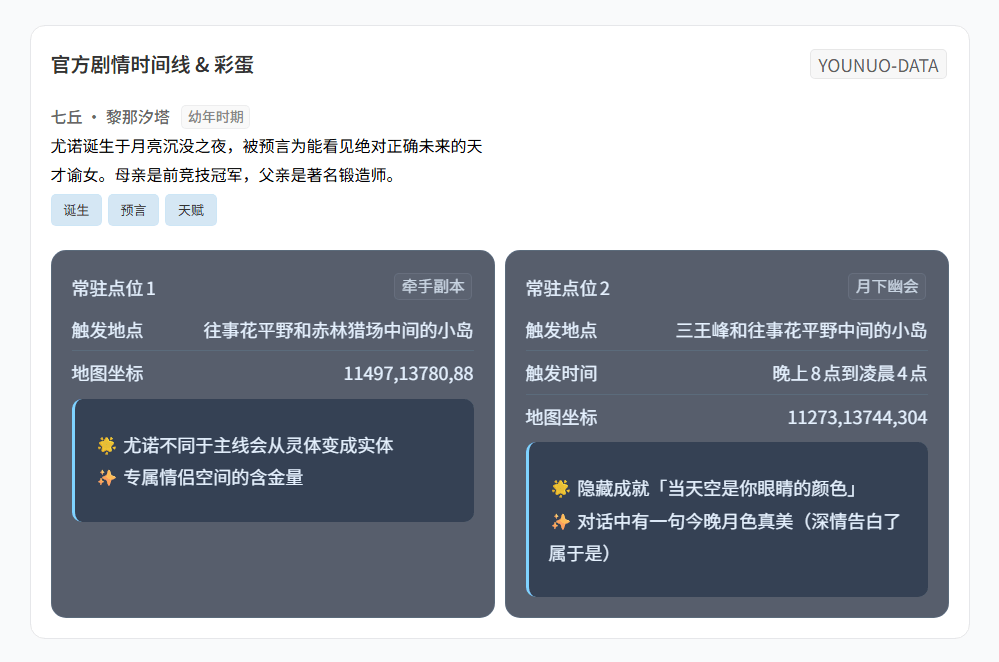
说明文字,还支持通过 width 或 height 属性指定尺寸 - 2.优化
时间线&彩蛋组件中的样式混乱,更新迭代全新数据表,为后续的适配准备 - 3.优化
时间线&彩蛋组件、共鸣链&机制组件中的标题显示变量,采用类TAB分栏显示,更加轻量化。 - 4.优化
时间线&彩蛋组件、共鸣链&机制组件中的部分变量,清除过久的代码,以防出现后续无法解读作用的代码(样式保留)。
V20260309-PRE
- 1.优化
时间线&彩蛋组件,对彩蛋中的内容进行solt化(即在配置项外中的标签中的MD写法转译渲染成class) - 2.优化
时间线&彩蛋组件配置项混乱无序的写法,去除不必要的配置项 - 3.调整
时间线&彩蛋组件、共鸣链&机制组件、物品组件、信息组件、故事组件对各个角色的适配,由于已经solt文本化所以废弃了大量依靠对文本适配的配置项,部分组件保留角色类型。对特定类型角色进行单独css适配,极大简洁化浏览。 - 4.新增
莫宁、琳奈、尤诺、奥古斯塔角色类型,爱弥斯类型完全完善无需更改 - 5.优化文章配置项具体内容
- 6.对文章中的部分组件预览进行修改
V20260308-PRE
- 1.修复
共鸣链&机制组件中的简介未能计入字数的问题 - 2.优化
共鸣链&机制组件配置项,并且采用mdc config+mdc content的写法
V20260307-PRE
- 1.修复
物品组件中的简介未能计入字数的问题 - 2.优化
物品组件配置项,并且采用mdc config+mdc content的写法
V20260307-PRE
- 1.修复
信息组件中的简介未能计入字数的问题 - 2.修复
故事组件中的每个章节未能计入字数的问题 - 3.取消
信息组件、故事组件中对于部分繁琐的配置项信息,并且采用mdc config+mdc content的写法 - 4.对全部组件进行配置项删除
V20260306-PRE
- 1.针对
爱弥斯的人物模块中的档案部分的副标题样式进行调整 - 2.对
物品组件进行优化并加入多个角色类型,并使用复合型组件来兼容多个数据类型
V20260304-PRE
- 1.优化部分组件样式
V20260227-PRE
- 1.添加新模块,并更新具体配置项与组件写法
- 2.优化新组件中的移动端
- 3.优化切换方式
V20260225-PRE
- 1.添加全新模块,并且更新了新模块的配置
- 2.更新全部模块的样式,并且使用复合型TS配置项
部分 - 3.更新文章中旧配置项,并且出现写入配置项
- 4.更新部分模块中的显隐逻辑
- 5.浓缩部分新模块配置项
V20260224-PRE
- 1.更新了相关配置项的使用方式
- 2.更新了模块在文章中的写法
V20260223-PRE
- 1.更新基础模块,并且优化部分逻辑
- 2.更新一些配置项,取消部分未使用的样式
评论区
评论加载中...